
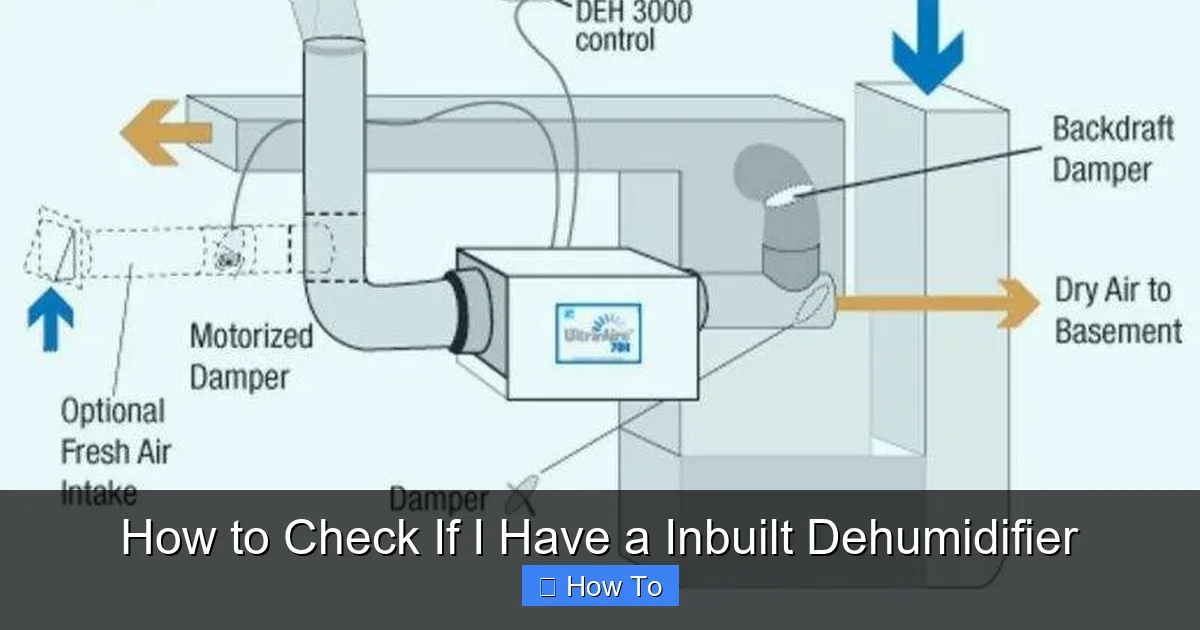
Wondering if your home has a built-in dehumidifier? This guide walks you through simple checks to identify, locate, and verify the function of an inbuilt dehumidifier. Save energy and improve air quality by confirming its presence and operation.
Quick Answers to Common Questions
Can I check for an inbuilt dehumidifier without opening my HVAC unit?
Yes! Start by checking your thermostat for dehumidification settings, reviewing home documentation, or using a hygrometer to test humidity levels. These non-invasive methods can often confirm the presence of a built-in system.
Do all air conditioners have built-in dehumidifiers?
Not all. While most AC units remove some moisture during cooling, only systems with enhanced dehumidification features or dedicated whole-house units actively control humidity levels independently of temperature.
How often should I maintain my inbuilt dehumidifier?
Replace the air filter every 1–3 months and schedule professional maintenance once a year. Clean the drain line and coils as needed to ensure optimal performance.
Can I install an inbuilt dehumidifier in an older home?
Yes, many HVAC contractors can retrofit a whole-house dehumidifier into existing ductwork. It’s a worthwhile upgrade for homes in humid climates or with moisture issues.
Is a portable dehumidifier better than an inbuilt one?
Portable units are cheaper and easier to install but only work in one room. Inbuilt dehumidifiers cover the entire home and are more efficient for whole-house moisture control.
How to Check If I Have an Inbuilt Dehumidifier
Have you ever walked into your home and noticed the air feels crisp and dry, even on a humid summer day? Or maybe you’ve spotted a mysterious vent near your furnace and wondered what it does? You might already have an inbuilt dehumidifier—a hidden but powerful feature designed to improve indoor air quality, prevent mold, and boost comfort.
Unlike portable dehumidifiers that sit in a corner and collect water in a tank, an inbuilt (or whole-house) dehumidifier is integrated into your home’s HVAC (heating, ventilation, and air conditioning) system. It works quietly behind the scenes, pulling moisture from the air as it circulates through your ducts. But how do you know if you have one? Many homeowners aren’t even aware their system includes this feature.
In this comprehensive guide, we’ll walk you through step-by-step methods to check if you have an inbuilt dehumidifier. You’ll learn how to inspect your HVAC system, read your thermostat, review home documentation, and even test humidity levels to confirm functionality. Whether you’re dealing with musty odors, condensation on windows, or just curious about your home’s air quality features, this guide will help you uncover the truth.
What Is an Inbuilt Dehumidifier?
Before diving into detection methods, it’s important to understand what an inbuilt dehumidifier actually is. Unlike standalone units, an inbuilt dehumidifier is a permanent fixture connected to your home’s central air system. It’s typically installed in the basement, crawl space, or utility closet, near the furnace or air handler.
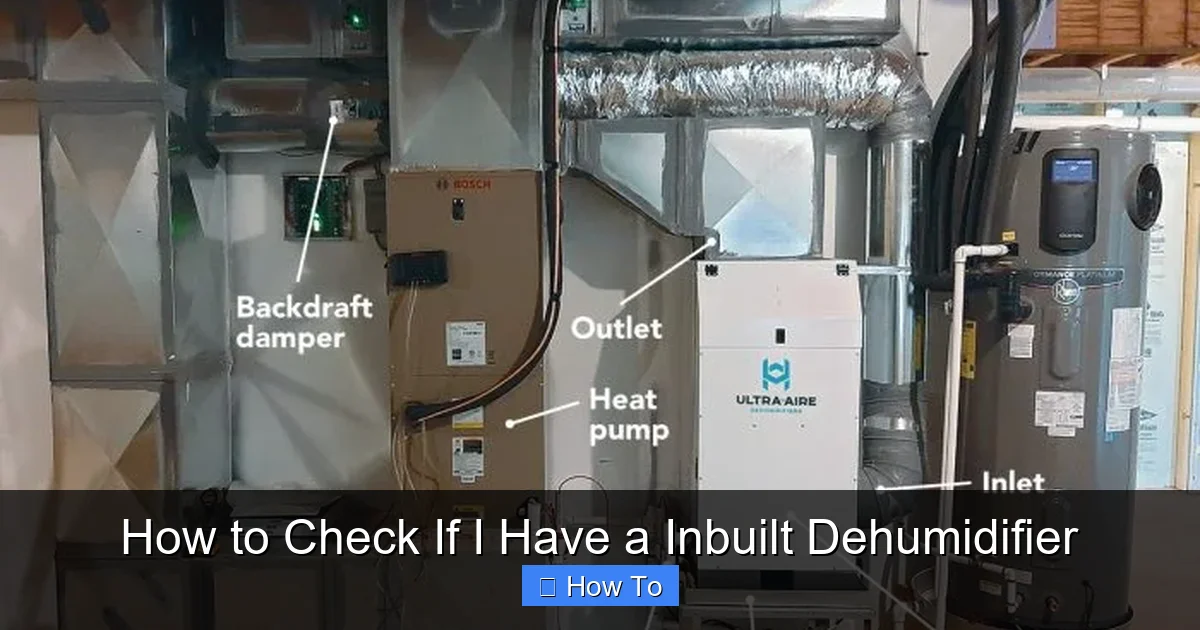
Visual guide about How to Check If I Have a Inbuilt Dehumidifier
Image source: s3.amazonaws.com
These systems work by drawing humid air from your home through return ducts, cooling it to remove moisture (like a refrigerator coil), and then reheating and redistributing the dry air back into your living spaces. Some models operate independently, while others are integrated into heat pumps or air conditioners with enhanced dehumidification modes.
In humid climates—such as the southeastern United States, coastal regions, or areas with high groundwater—builders often install inbuilt dehumidifiers to combat mold, dust mites, and structural damage. They’re also common in energy-efficient homes where tight insulation can trap moisture indoors.
Step 1: Check Your Thermostat or HVAC Control Panel
One of the easiest ways to check for an inbuilt dehumidifier is by examining your thermostat or HVAC control panel. Modern smart thermostats and advanced HVAC systems often include settings specifically for dehumidification.
Look for a “Dehumidify” or “Dry Air” Mode
Turn on your thermostat and navigate through the menu options. Look for labels like:
- “Dehumidify”
- “Dry Air”
- “Humidity Control”
- “Auto Dehumidification”
If you see any of these, your system likely has a built-in dehumidification feature. Some systems allow you to set a target humidity level (e.g., 45% or 50%), which the unit will maintain automatically.
Check for a Dedicated Dehumidifier Button
On older or high-end HVAC systems, there may be a physical button or switch labeled “Dehumidifier” on the control panel. This is a strong indicator that your home has a dedicated inbuilt unit.
Review the User Manual
If you can’t find the setting on the thermostat, check the user manual for your HVAC system. Search for terms like “whole-house dehumidifier,” “integrated dehumidification,” or “humidity control.” Many manuals include diagrams showing how the dehumidifier connects to the system.
Example: Smart Thermostat Indicators
For example, a Nest or Ecobee smart thermostat might display a humidity percentage on the home screen. If the system is actively reducing humidity, you may see a message like “Dehumidifying” or “Reducing Humidity.” This confirms that your HVAC system is equipped with dehumidification capabilities.
Step 2: Inspect Your HVAC System and Ductwork
If your thermostat doesn’t reveal anything, it’s time to inspect your HVAC system directly. This step requires a bit of hands-on checking, but it’s straightforward and safe if you follow basic precautions.
Locate Your Furnace or Air Handler
Start by finding your furnace, heat pump, or air handler. These are usually located in the basement, attic, garage, or a dedicated utility closet. Turn off the power to the unit at the circuit breaker before opening any panels—safety first!
Look for a Dehumidifier Unit or Access Panel
Once inside, look for a separate unit connected to the ductwork. An inbuilt dehumidifier often resembles a small metal box with refrigerant lines, a compressor, and an air filter. It may be mounted above or beside the furnace.
Some systems have a clear access panel labeled “Dehumidifier” or “Humidity Control.” If you see one, that’s a strong sign you have a built-in unit.
Check for Refrigerant Lines and Drain Hoses
Inbuilt dehumidifiers use refrigerant to cool air and remove moisture, just like an air conditioner. Look for copper refrigerant lines (usually insulated) running from the dehumidifier to the main HVAC unit. You may also see a small plastic drain hose leading to a floor drain or condensate pump—this removes collected water.
Listen for Operation Sounds
Turn the system back on and listen carefully. A dehumidifier in operation typically produces a low hum or gentle whirring sound. If you hear this noise coming from near your furnace or ductwork—especially when the air conditioner isn’t running—it could be the dehumidifier working.
Feel for Airflow Changes
Place your hand near supply vents in different rooms. If the air feels slightly warmer or drier than usual during operation, it may indicate the dehumidifier is active. Some systems blow air at a higher temperature to avoid overcooling while removing moisture.
Step 3: Review Your Home’s Documentation
When all else fails, your home’s paperwork might hold the answer. Builders, HVAC contractors, and previous homeowners often leave behind valuable information about installed systems.
Check the Builder’s Manual or Home Warranty
If you have a relatively new home, look for a builder’s manual or homeowner’s guide. These documents often include a list of installed appliances and systems, including dehumidifiers. Search for sections on “HVAC,” “Indoor Air Quality,” or “Moisture Control.”
Review HVAC Installation Records
Contact your HVAC contractor or check old service records. If a dehumidifier was installed during construction or a recent upgrade, it should be listed in the work order or invoice. Look for terms like “whole-house dehumidifier,” “AprilAire,” “Honeywell,” or “Lennox.”
Ask the Previous Homeowner
If you recently bought the home, reach out to the previous owner. They may remember installing a dehumidifier or know if the system includes humidity control features. A simple email or phone call could save you hours of detective work.
Example: Finding Clues in Spec Sheets
For instance, a spec sheet might list: “Lennox XC25 Air Conditioner with Enhanced Dehumidification Technology.” This indicates the AC unit has built-in dehumidification, even if it’s not a separate device.
Step 4: Use a Hygrometer to Test Humidity Levels
Even if you can’t visually confirm an inbuilt dehumidifier, you can test its effectiveness using a hygrometer—a device that measures indoor humidity.
Buy or Borrow a Hygrometer
You can purchase a digital hygrometer for under $20 at most hardware stores or online. Place it in a central location, like the living room, away from direct sunlight or drafts.
Record Baseline Humidity
Let the hygrometer sit for 24 hours and record the average humidity level. Ideal indoor humidity should be between 30% and 50%. If it’s consistently above 60%, your home may have a moisture problem—even with a dehumidifier.
Activate Suspected Dehumidifier and Monitor
If you suspect your HVAC system has dehumidification, turn on the “Dehumidify” mode (if available) or set your thermostat to a lower humidity level. Leave the system running for 6–12 hours.
Check the hygrometer again. If the humidity drops significantly—say, from 65% to 48%—your system is likely removing moisture, confirming the presence of an inbuilt dehumidifier.
Compare with Outdoor Humidity
On a humid day, check the outdoor humidity using a weather app. If your indoor humidity is noticeably lower, it’s a good sign your home has active dehumidification.
Step 5: Consult an HVAC Professional
If you’ve tried all the above steps and still aren’t sure, it’s time to call in the experts. An HVAC technician can quickly identify whether your system includes an inbuilt dehumidifier and test its performance.
Schedule a System Inspection
Contact a licensed HVAC contractor and request a “whole-house dehumidifier inspection.” Most technicians can visit within a few days and provide a detailed report.
Ask Specific Questions
During the inspection, ask:
- “Does this system include a built-in dehumidifier?”
- “Is the dehumidifier functioning properly?”
- “Can you show me where it’s installed?”
- “Are there any maintenance issues?”
A professional can also check refrigerant levels, clean coils, and ensure the drain line is clear—common issues that reduce dehumidifier efficiency.
Get a Written Assessment
Ask for a written summary of their findings. This document can be useful for future reference, insurance claims, or home resale.
Troubleshooting Common Issues
Even if you confirm you have an inbuilt dehumidifier, it might not be working correctly. Here are common problems and solutions.
Dehumidifier Isn’t Reducing Humidity
Possible Causes:
- Clogged air filter
- Frozen coils
- Low refrigerant
- Faulty humidistat
Solution: Replace the air filter, check for ice buildup, and call a technician if the issue persists.
Water Leaking from the Unit
Possible Causes:
- Clogged drain line
- Damaged condensate pump
- Improper installation
Solution: Clear the drain line with a wet/dry vacuum or vinegar solution. Replace the pump if necessary.
Unusual Noises or Odors
Possible Causes:
- Dust buildup on coils
- Worn motor bearings
- Mold growth in the unit
Solution: Clean the unit and ducts. Schedule professional maintenance if mold is suspected.
Benefits of Confirming Your Inbuilt Dehumidifier
Knowing whether you have an inbuilt dehumidifier isn’t just about curiosity—it can improve your home’s comfort, health, and efficiency.
Improved Air Quality
By reducing excess moisture, dehumidifiers help prevent mold, mildew, and dust mites—common triggers for allergies and asthma.
Energy Savings
A well-functioning dehumidifier allows you to set your thermostat higher in summer without feeling sticky. This can reduce cooling costs by up to 10%.
Protects Your Home
Excess humidity can warp wood, damage drywall, and corrode metal. Dehumidification helps preserve your home’s structure and finishes.
Enhanced Comfort
Dry air feels cooler and more comfortable, especially during humid months. You’ll notice fewer sweaty nights and fresher-smelling clothes.
Conclusion
Checking if you have an inbuilt dehumidifier doesn’t require advanced technical skills—just a little curiosity and attention to detail. By examining your thermostat, inspecting your HVAC system, reviewing documentation, testing humidity levels, and consulting professionals when needed, you can confidently determine whether your home is equipped with this valuable feature.
An inbuilt dehumidifier is more than a luxury—it’s a smart investment in your health, comfort, and home longevity. Once you confirm its presence, make sure it’s well-maintained and functioning properly. Regular filter changes, annual inspections, and prompt repairs will keep it running efficiently for years to come.
So the next time you walk into your home and breathe in that crisp, dry air, you’ll know exactly why. And if you discover you don’t have one? Now you’re equipped with the knowledge to consider adding one—your future self will thank you.