
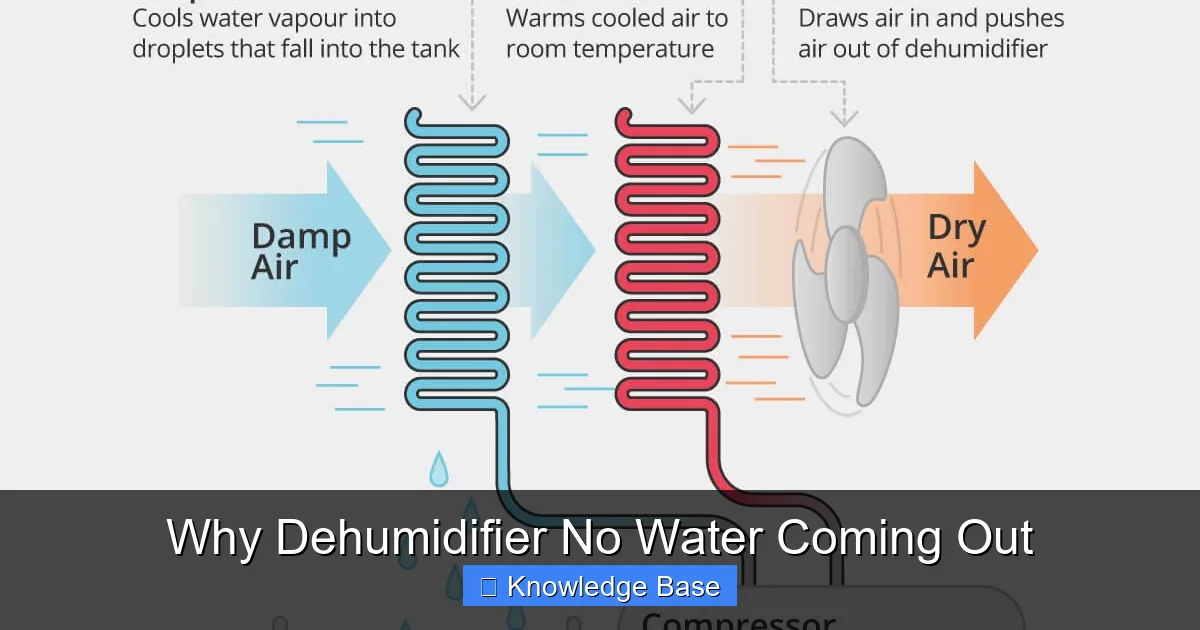
If your dehumidifier no water coming out, it doesn’t always mean it’s broken. Common causes include low humidity, a full tank, or a frozen coil. With simple troubleshooting, you can often get it working again fast.
Key Takeaways
- Low humidity levels: If the air is already dry, the dehumidifier won’t collect much water—check your home’s humidity with a hygrometer.
- Full or improperly installed water tank: A full tank or one that’s not seated correctly can stop the unit from running or draining.
- Frozen coils: In cold environments, moisture can freeze on the coils, blocking airflow and preventing water collection.
- Dirty air filter or coils: Clogged filters or dusty coils reduce efficiency and may cause the unit to shut down or collect less water.
- Incorrect settings or mode: Some models have auto-off features or dry-air modes that pause water collection under certain conditions.
- Drain hose issues: If using a continuous drain hose, kinks, clogs, or improper setup can prevent water from flowing out.
- Mechanical or sensor failure: Faulty float switches, sensors, or compressors may require professional repair or replacement.
📑 Table of Contents
- Why Dehumidifier No Water Coming Out: Understanding the Basics
- Is Your Home Too Dry? The Humidity Factor
- Checking the Water Tank: Full or Misaligned?
- Frozen Coils: A Common Culprit in Cold Environments
- Dirty Air Filter and Coils: The Hidden Efficiency Killers
- Incorrect Settings or Mode: Is Your Unit in the Right Mode?
- Drain Hose and Mechanical Problems: When It’s More Than Just Settings
- Conclusion: Getting Your Dehumidifier Back on Track
Why Dehumidifier No Water Coming Out: Understanding the Basics
You’ve just bought a shiny new dehumidifier, or maybe you’ve been using one for years. It’s humming along, lights are on, and it seems to be running—but when you check the water tank, it’s still empty. Or worse, you’ve been running it all day and not a single drop has collected. Frustrating, right?
Before you panic and assume your dehumidifier is broken, take a deep breath. The truth is, there are several common and often fixable reasons why a dehumidifier no water coming out. Most of these issues don’t require a technician or a costly repair. In fact, with a little know-how and some basic troubleshooting, you can often get your unit back to pulling moisture from the air in no time.
Dehumidifiers work by pulling in humid air, cooling it over cold coils to condense moisture, and then collecting that water in a tank or draining it away. But if any part of this process is disrupted—whether by environmental conditions, user error, or mechanical issues—the result can be little to no water output. Understanding how your dehumidifier operates is the first step toward solving the problem.
In this guide, we’ll walk you through the most common reasons your dehumidifier isn’t collecting water, how to diagnose each issue, and what you can do to fix it. Whether you’re dealing with a brand-new unit or an older model that’s lost its efficiency, this article will help you get the most out of your investment.
Is Your Home Too Dry? The Humidity Factor

Visual guide about Why Dehumidifier No Water Coming Out
Image source: cdn.mos.cms.futurecdn.net
One of the most overlooked reasons a dehumidifier no water coming out is simply that the air in your home isn’t humid enough to begin with. Dehumidifiers are designed to remove excess moisture, not create dryness from nothing. If your indoor humidity is already low—say, below 40%—your unit may run but collect very little water.
How to Check Indoor Humidity Levels
The best way to determine if low humidity is the culprit is to use a hygrometer. This small, inexpensive device measures the moisture content in the air. You can find digital hygrometers at most hardware stores or online for under $20. Place it in the same room as your dehumidifier and let it sit for a few hours to get an accurate reading.
Ideal indoor humidity levels typically range between 30% and 50%. If your reading is consistently below 40%, especially in cooler months, your dehumidifier may not have enough moisture to extract. In such cases, running a dehumidifier might not be necessary—and that’s perfectly normal.
Seasonal Changes and Their Impact
Humidity levels fluctuate with the seasons. During winter, indoor air tends to be drier due to heating systems, which pull moisture from the air. Conversely, summer brings high humidity, especially in basements, bathrooms, and laundry rooms. If you’re running your dehumidifier in winter and not seeing water, it could simply be because the air is already dry.
For example, if you live in a dry climate like Arizona or Colorado, your home may naturally stay below 40% humidity year-round. In that case, a dehumidifier might not be needed at all. On the other hand, if you’re in a humid region like Florida or Louisiana, you’ll likely see water collection daily—even hourly—during peak seasons.
When to Run Your Dehumidifier
To get the most out of your unit, run it during times when humidity is highest. This is usually in the early morning or after showers, cooking, or laundry. You can also set your dehumidifier to maintain a specific humidity level (e.g., 45%) using its built-in humidistat. This way, it only runs when needed, saving energy and preventing unnecessary wear.
If you’ve confirmed that your home’s humidity is within the ideal range and your dehumidifier still isn’t collecting water, it’s time to look at other potential causes.
Checking the Water Tank: Full or Misaligned?

Visual guide about Why Dehumidifier No Water Coming Out
Image source: gardentabs.com
One of the simplest—and most common—reasons a dehumidifier no water coming out is a full or improperly installed water tank. Many modern dehumidifiers are equipped with a float switch that automatically shuts off the unit when the tank is full. This prevents overflow and water damage. But if the tank isn’t seated correctly, the switch may not reset, leaving the unit running but not collecting water.
How to Inspect the Water Tank
Start by turning off and unplugging your dehumidifier. Then, carefully remove the water tank. Check if it’s full—even a small amount of water can trigger the float switch. If it is, empty it completely and wipe the inside with a clean, dry cloth to remove any residue or mold.
Next, inspect the tank for cracks, warping, or damage. A cracked tank may not seal properly, preventing the float switch from functioning. Also, check the float mechanism itself. It should move freely up and down. If it’s stuck or jammed, gently clean it with warm water and a soft brush.
Reinstalling the Tank Correctly
After emptying and cleaning the tank, reinsert it into the dehumidifier. Make sure it clicks into place and sits level. Some models have alignment guides or notches that must match up. If the tank isn’t fully seated, the unit may not restart or may continue running without collecting water.
Once the tank is properly installed, plug the unit back in and turn it on. Wait 15–30 minutes and check for water collection. If the tank was the issue, you should see moisture starting to accumulate.
Using a Continuous Drain Hose
If you’re using a continuous drain hose instead of the tank, ensure the hose is properly connected and not kinked or clogged. The hose should run downhill to allow gravity to assist drainage. If it loops upward or gets blocked, water won’t flow out, and the unit may stop collecting.
Also, check that the drain port on the dehumidifier is clean and free of debris. A clogged drain port can mimic a full tank issue, even if the hose is clear.
Frozen Coils: A Common Culprit in Cold Environments
If your dehumidifier is running but no water is coming out—and the tank isn’t full—frozen coils could be the problem. This issue is especially common in basements, garages, or crawl spaces where temperatures drop below 65°F (18°C). When cold air passes over the dehumidifier’s cold coils, moisture in the air can freeze instead of condensing into liquid water.
How to Identify Frozen Coils
Signs of frozen coils include:
– The unit is running, but no water is collected.
– You hear the fan but not the compressor.
– Ice buildup is visible on the front or back of the unit.
– The dehumidifier shuts off unexpectedly.
To check for ice, turn off the unit and unplug it. Wait 30–60 minutes for any ice to melt. Then, carefully inspect the coils (usually located behind the front or back panel). If you see frost or ice, frozen coils are likely the cause.
Why Do Coils Freeze?
Dehumidifiers work by cooling air below its dew point, causing moisture to condense. But in cold environments, the coils can get so cold that water vapor freezes directly onto them. This blocks airflow and prevents the unit from collecting moisture. Additionally, if the air filter is dirty, it restricts airflow, making the coils even colder and more prone to freezing.
How to Fix Frozen Coils
The first step is to turn off the dehumidifier and let it sit in a warmer area for several hours. Do not use a hair dryer or heat gun to speed up the process—this can damage the components. Once the ice has melted, clean the air filter and check for any blockages in the airflow.
If you frequently use your dehumidifier in a cold space, consider moving it to a warmer room or using a model designed for low-temperature operation. Some dehumidifiers have auto-defrost features that periodically warm the coils to prevent freezing.
Preventing Future Freezing
To avoid frozen coils in the future:
– Keep the room temperature above 65°F (18°C).
– Clean the air filter monthly.
– Ensure proper airflow around the unit (at least 6–12 inches of clearance).
– Use a dehumidifier with a low-temperature rating if needed.
Dirty Air Filter and Coils: The Hidden Efficiency Killers
Even if your dehumidifier is running and the tank isn’t full, a dirty air filter or clogged coils can severely reduce its ability to collect water. Over time, dust, pet hair, and debris accumulate on the filter and coils, blocking airflow and insulating the cooling surfaces. This makes it harder for the unit to pull moisture from the air.
The Role of the Air Filter
The air filter is the first line of defense in your dehumidifier. It traps dust and particles before they reach the internal components. A clean filter ensures maximum airflow, which is essential for efficient moisture removal. When the filter is clogged, the unit has to work harder, leading to reduced performance and potential overheating.
How to Clean the Air Filter
Most dehumidifiers have a removable washable filter. To clean it:
1. Turn off and unplug the unit.
2. Remove the filter (usually located behind a front or side panel).
3. Rinse it under warm water or use a soft brush to remove dust.
4. Let it air dry completely before reinstalling.
Avoid using soap or harsh chemicals, as they can leave residues that attract more dirt. Clean the filter every 2–4 weeks during heavy use, or monthly during lighter use.
Cleaning the Coils
The evaporator and condenser coils are where moisture condenses and heat is released. Over time, these coils can collect dust and grime, reducing their efficiency. To clean them:
1. Unplug the dehumidifier and remove the front or back panel.
2. Use a soft brush or vacuum with a brush attachment to gently remove dust.
3. For stubborn buildup, use a coil cleaner spray (available at hardware stores).
4. Wipe away any residue with a damp cloth.
Be careful not to bend the delicate fins on the coils. If they’re bent, use a fin comb to straighten them.
Signs Your Filter or Coils Need Cleaning
– Reduced water collection.
– The unit runs longer than usual.
– Unusual noises or overheating.
– Visible dust or debris on the filter or coils.
Regular maintenance not only improves performance but also extends the life of your dehumidifier.
Incorrect Settings or Mode: Is Your Unit in the Right Mode?
Sometimes, the reason your dehumidifier no water coming out is as simple as being on the wrong setting. Many modern dehumidifiers come with multiple modes, such as “Auto,” “Continuous,” “Dry,” or “Laundry.” Each mode is designed for specific conditions, and using the wrong one can affect water collection.
Understanding Dehumidifier Modes
– **Auto Mode:** The unit runs until the desired humidity level is reached, then shuts off. If your home is already dry, it may not run long enough to collect water.
– **Continuous Mode:** The dehumidifier runs nonstop, regardless of humidity levels. This is useful in very damp areas but uses more energy.
– **Dry Mode:** Some models have a “Dry” setting that focuses on reducing humidity quickly, often used after flooding or heavy moisture events.
– **Laundry Mode:** Optimized for drying clothes indoors, this mode runs longer and at higher fan speeds.
If your unit is in Auto mode and your home’s humidity is already low, it may shut off before collecting much water. Try switching to Continuous mode for a few hours to see if water starts to accumulate.
Check the Humidistat Setting
The humidistat controls when the dehumidifier turns on and off based on humidity levels. If it’s set too low (e.g., 30%), the unit may never activate. Adjust it to 45–50% and monitor the results. Some models also have a “Turbo” or “High” fan setting that increases airflow and moisture collection.
Timer and Sleep Modes
If your dehumidifier has a timer or sleep mode, it may be programmed to turn off after a certain period. Check the display or remote control to ensure it’s not set to shut down prematurely. Also, some units have a “Quiet” mode that reduces fan speed, which can slow down water collection.
Sensor Issues
In rare cases, a faulty humidistat or sensor can cause the unit to misread humidity levels. If you suspect a sensor problem, consult the user manual or contact the manufacturer. Some models allow you to recalibrate the sensor, while others may need professional servicing.
Drain Hose and Mechanical Problems: When It’s More Than Just Settings
If you’ve ruled out environmental factors, tank issues, and settings, the problem may lie in the drain system or internal mechanics. This includes issues with the drain hose, float switch, compressor, or fan motor.
Drain Hose Troubleshooting
If you’re using a continuous drain hose:
– Ensure it’s not kinked, clogged, or disconnected.
– The hose should run downhill without loops or siphons.
– Check the drain port on the unit for blockages.
– Use a wet/dry vacuum to clear any clogs if needed.
If the hose is clear but water still isn’t flowing, the issue may be with the pump (on pump-equipped models) or the drain valve.
Float Switch Malfunction
The float switch is a small device inside the water tank that rises with the water level. When the tank is full, it triggers a shut-off mechanism. If the switch is stuck, damaged, or misaligned, the unit may not restart even after emptying the tank.
To test the float switch:
1. Remove the tank and manually lift the float.
2. Listen for a click—this indicates the switch is working.
3. If there’s no click, the switch may be faulty and need replacement.
Compressor or Fan Issues
The compressor is the heart of the dehumidifier, responsible for cooling the coils. If it’s not running, no moisture will condense. Signs of compressor failure include:
– The unit turns on but doesn’t cool.
– You hear a clicking sound but no hum.
– The unit overheats or trips the circuit breaker.
Fan motor problems can also reduce airflow. If the fan isn’t spinning or is running slowly, the unit won’t pull in enough air to collect moisture.
These issues typically require professional diagnosis and repair. If your dehumidifier is under warranty, contact the manufacturer before attempting any repairs.
When to Call a Professional
If you’ve tried all the above steps and your dehumidifier still no water coming out, it may be time to call a technician. Signs that professional help is needed include:
– Burning smells or smoke.
– Loud grinding or buzzing noises.
– Water leaks not related to the tank.
– The unit trips the breaker repeatedly.
Regular maintenance and prompt attention to issues can prevent many of these problems. But when in doubt, it’s better to get expert help than risk further damage.
Conclusion: Getting Your Dehumidifier Back on Track
Finding out your dehumidifier no water coming out can be frustrating, but in most cases, the solution is simpler than you think. Start by checking the basics: Is the tank full? Is the air dry? Are the coils frozen? From there, move on to cleaning the filter and coils, verifying the settings, and inspecting the drain system.
Remember, dehumidifiers are designed to work best in humid environments. If your home is already dry, don’t expect a full tank every day—and that’s okay. Regular maintenance, proper placement, and correct usage will keep your unit running efficiently for years to come.
By following the troubleshooting steps in this guide, you’ll not only solve the immediate problem but also prevent future issues. And if all else fails, don’t hesitate to reach out to the manufacturer or a qualified technician. Your dehumidifier is an investment in your home’s comfort and health—treat it well, and it will do the same for you.
Frequently Asked Questions
Why is my dehumidifier running but not collecting water?
This is often due to low humidity, a full tank, frozen coils, or a dirty filter. Check the tank, clean the filter, and ensure the room isn’t too cold or dry.
Can a dehumidifier work in cold temperatures?
Most standard dehumidifiers struggle below 65°F (18°C) and may freeze. Use a low-temperature model or move the unit to a warmer area.
How often should I clean my dehumidifier filter?
Clean the filter every 2–4 weeks during heavy use, or monthly during lighter use. A dirty filter reduces airflow and efficiency.
Is it normal for a dehumidifier to not collect water in winter?
Yes, if indoor humidity is already low due to heating, the unit may run but collect little to no water. Use a hygrometer to check levels.
Can I use a dehumidifier with a drain hose instead of a tank?
Yes, many models support continuous drainage. Just ensure the hose is properly installed, unclogged, and runs downhill.
What should I do if my dehumidifier keeps shutting off?
Check if the tank is full, the float switch is stuck, or the coils are frozen. Also, verify the humidistat setting and ensure proper airflow.