
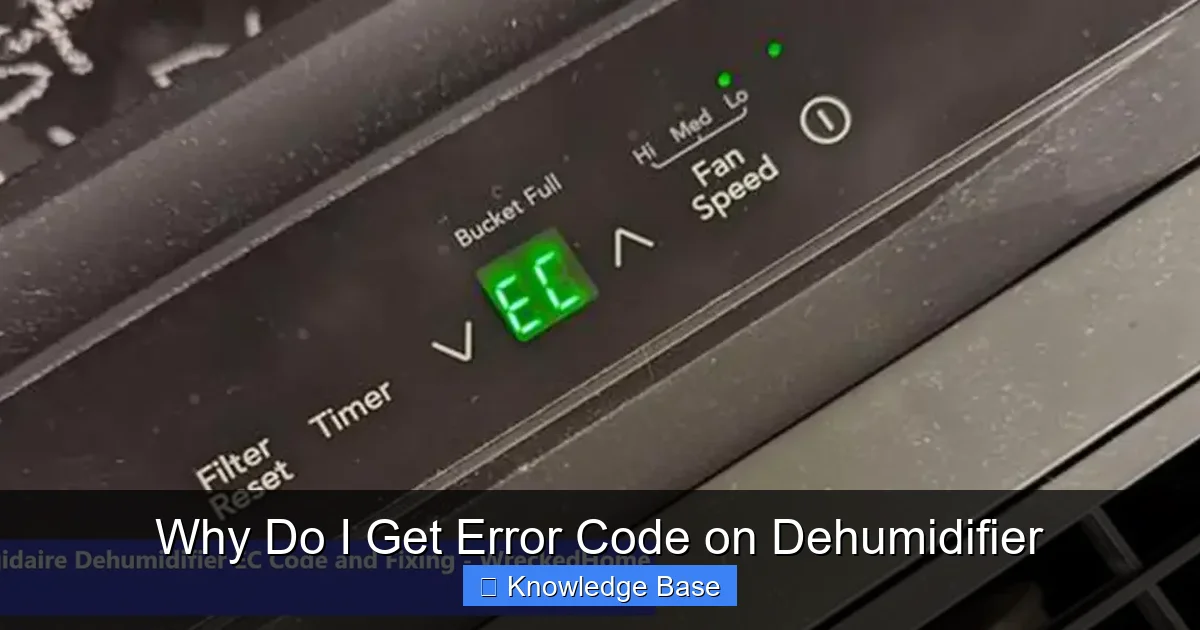
Seeing an error code on your dehumidifier can be confusing and frustrating. This guide explains the most common reasons behind these alerts, from sensor issues to drainage problems, and offers practical solutions to get your unit running smoothly again.
Key Takeaways
- Error codes signal specific problems: Most dehumidifiers use error codes to alert you to issues like sensor malfunctions, drainage blockages, or refrigerant leaks.
- Check the user manual first: Always refer to your model’s manual to decode the exact meaning of the error code displayed.
- Frost buildup is a common cause: If the coils freeze, the unit may shut down and display an error—defrosting and cleaning can often fix this.
- Drainage issues trigger alerts: Clogged hoses, full tanks, or faulty pumps can cause overflow errors even when the tank isn’t visibly full.
- Electrical faults require caution: Power surges, damaged wiring, or control board failures may need professional repair.
- Regular maintenance prevents errors: Cleaning filters, coils, and checking hoses monthly reduces the risk of unexpected shutdowns.
- Resetting may solve temporary glitches: A simple power cycle can clear minor software hiccups causing false error codes.
📑 Table of Contents
- Understanding Dehumidifier Error Codes: What They Mean and Why They Appear
- Common Causes of Dehumidifier Error Codes
- How to Read and Decode Your Dehumidifier’s Error Codes
- Step-by-Step Troubleshooting for Common Error Codes
- When to Call a Professional: Recognizing Serious Problems
- Preventing Future Error Codes: Maintenance Tips
- Conclusion
Understanding Dehumidifier Error Codes: What They Mean and Why They Appear
If you’ve ever been woken up by a blinking red light or an unfamiliar code on your dehumidifier’s display, you’re not alone. These error messages are designed to protect your appliance and alert you to potential problems—but they can feel overwhelming if you don’t know what they mean. The good news? Most error codes are fixable with a little troubleshooting and regular care.
Dehumidifiers are essential for maintaining healthy indoor air quality, especially in damp climates or during humid seasons. They work by pulling moisture from the air, collecting it in a tank or draining it directly outside. But like any appliance, they rely on a network of sensors, fans, coils, and electronics to function properly. When one component fails or operates outside normal parameters, the system triggers an error code to prevent further damage.
These codes vary by brand and model—Frigidaire might show “E1” for a sensor issue, while a GE unit displays “F1” for a full tank. Some are simple reminders (like a full water bucket), while others indicate serious mechanical or electrical faults. The key is not to panic. Instead, treat the error code as your dehumidifier’s way of saying, “Hey, something’s not right—let’s fix it together.”
In this guide, we’ll walk you through the most common reasons you get error code on dehumidifier, how to interpret them, and what steps you can take to resolve them. Whether you’re dealing with a frozen coil, a clogged drain, or a mysterious electronic glitch, we’ve got practical solutions to help you get back to dry, comfortable air.
Common Causes of Dehumidifier Error Codes

Visual guide about Why Do I Get Error Code on Dehumidifier
Image source: candid.technology
When your dehumidicator flashes an error code, it’s usually pointing to one of several underlying issues. Understanding these causes is the first step toward a quick fix. Let’s break down the most frequent culprits behind dehumidifier error codes.
Sensor Malfunctions
One of the most common reasons you get error code on dehumidifier is a faulty sensor. Dehumidifiers use multiple sensors to monitor temperature, humidity, and airflow. If a sensor becomes dirty, misaligned, or damaged, it may send incorrect data to the control board, triggering an error.
For example, the humidity sensor might detect abnormally high or low moisture levels even when the room is normal. This can cause the unit to shut down or refuse to start. Similarly, a temperature sensor near the coils might misread freezing conditions, prompting a frost protection error.
What you can do: Start by cleaning the sensors gently with a soft cloth. Avoid using water or harsh chemicals. If the error persists, consult your manual to locate the sensor and check for visible damage. In some cases, recalibrating or replacing the sensor may be necessary—though this is best left to a technician.
Drainage and Water Tank Issues
Dehumidifiers collect water in a tank or send it through a hose to a drain. If the tank is full, the hose is clogged, or the pump fails, the unit will often display an error code to prevent overflow.
Even if the tank doesn’t look full, a stuck float switch—a small device that rises with the water level—can falsely signal a full tank. Similarly, a kinked or blocked drain hose can stop water flow, causing pressure buildup and triggering a drainage error.
Real-life example: Sarah noticed her dehumidifier kept turning off with an “E2” code. She emptied the tank, but the error returned within hours. After checking, she found the drain hose was bent behind the unit, blocking water flow. Straightening the hose solved the problem instantly.
Tip: Always check the float switch by gently lifting it. If it moves freely, the issue might be elsewhere. For hose drainage, ensure the hose is unobstructed and slopes downward to allow gravity flow.
Frost or Ice Buildup on Coils
If your dehumidifier runs in a cold environment—like a basement in winter—the evaporator coils can freeze. This blocks airflow and reduces efficiency. Most units have a defrost function, but if it fails or the room is too cold, ice can accumulate rapidly.
When sensors detect frost, they trigger an error code (often labeled “Frost,” “Defrost,” or a specific number like “E3”) and shut down the compressor to prevent damage.
What to do: Turn off the unit and let it sit for 1–2 hours to thaw. Once defrosted, clean the coils with a soft brush or vacuum. Ensure the room temperature stays above 65°F (18°C) for optimal operation. If freezing happens frequently, consider using a model designed for low-temperature environments.
Electrical and Power Problems
Power surges, faulty wiring, or a failing control board can also cause error codes. These issues are more serious and often require professional attention.
For instance, a sudden voltage spike might damage the internal circuitry, leading to random shutdowns or unresponsive displays. Similarly, a loose connection inside the unit can interrupt communication between components, resulting in false error messages.
Safety first: Never open the dehumidifier while it’s plugged in. If you suspect an electrical issue—such as burning smells, sparks, or repeated tripping of circuit breakers—unplug the unit immediately and contact a certified technician.
Compressor or Refrigerant Issues
The compressor is the heart of your dehumidifier, circulating refrigerant to remove moisture. If it fails or the refrigerant level drops due to a leak, the unit may overheat or stop working entirely.
Error codes related to the compressor often include terms like “High Pressure,” “Low Pressure,” or “Compressor Overload.” These are typically more complex and not user-fixable.
Example: Mark’s dehumidifier started showing “E5” after running nonstop for days. A technician diagnosed a refrigerant leak and replaced the sealed system. While costly, it restored full functionality.
If you suspect a refrigerant issue, avoid DIY repairs. Tampering with sealed systems is dangerous and often voids warranties.
How to Read and Decode Your Dehumidifier’s Error Codes
Visual guide about Why Do I Get Error Code on Dehumidifier
Image source: thamestechsolution.com
Not all error codes are created equal. Some are universal, while others are brand-specific. The best way to understand what your dehumidifier is trying to tell you is to consult the user manual.
Finding Your Model’s Error Code List
Every dehumidifier comes with a manual that includes a troubleshooting section. This section lists common error codes, their meanings, and recommended actions. If you’ve lost your manual, don’t worry—most manufacturers post digital copies on their websites.
Simply search for “[Your Brand] [Model Number] user manual PDF” in your browser. For example, “Frigidaire FDE70DGPW manual” will likely bring up the official document.
Common Error Codes by Brand
Here’s a quick reference for some popular brands:
- Frigidaire: “E1” = Humidity sensor error; “E2” = Temperature sensor error; “E3” = Frost detected.
- GE: “F1” = Full tank; “F2” = Drainage issue; “F3” = Defrost problem.
- hOmeLabs: “E1” = Full water tank; “E2” = Sensor malfunction; “E3” = Compressor overload.
- Keystone: “E1” = Humidity sensor fault; “E2” = Temperature sensor fault; “E3” = Frost protection.
- LG: “CH 01” = Filter needs cleaning; “CH 02” = Drain pump error.
Note: These codes can vary slightly between models, so always double-check your specific unit.
What If There’s No Code List?
If your manual doesn’t include error codes or you can’t find it online, try these steps:
- Search for “[Brand] dehumidifier error codes” on Google. Many appliance forums and repair sites compile user-reported codes.
- Contact customer support. Most brands have live chat or phone support that can help identify the issue.
- Look for blinking light patterns. Some units use flashing LEDs instead of digital codes—count the flashes and refer to the manual.
Remember: Even if you can’t decode the exact meaning, the error is still a sign that something needs attention. Ignoring it could lead to bigger problems down the line.
Step-by-Step Troubleshooting for Common Error Codes
Now that you understand what error codes mean, let’s walk through practical steps to fix them. Always start with the simplest solutions before moving to more complex repairs.
Step 1: Power Cycle the Unit
Sometimes, the error is just a temporary glitch. A power cycle—turning the unit off, unplugging it, and waiting—can reset the system and clear false alerts.
How to do it:
- Turn off the dehumidifier using the power button.
- Unplug it from the wall outlet.
- Wait 5–10 minutes to allow capacitors to discharge.
- Plug it back in and turn it on.
If the error disappears, great! If not, move to the next step.
Step 2: Check the Water Tank and Drainage
A full tank or blocked drain is one of the easiest fixes.
- Remove the water tank and empty it completely.
- Check the float switch—gently lift it to ensure it moves freely.
- If using a drain hose, inspect it for kinks, clogs, or disconnections.
- Clean the hose with warm water and a pipe cleaner if needed.
- Reinstall the tank or reconnect the hose securely.
Turn the unit back on. If the error clears, you’ve solved the problem.
Step 3: Clean the Air Filter and Coils
Dirty filters restrict airflow, causing the unit to overwork and potentially freeze. Clogged coils reduce efficiency and can trigger sensor errors.
Cleaning steps:
- Locate the air filter (usually behind a front or side panel).
- Remove it and vacuum or rinse it with warm water.
- Let it dry completely before reinserting.
- Use a soft brush or vacuum attachment to clean the evaporator and condenser coils.
- Wipe down the interior with a dry cloth.
Pro tip: Clean the filter every 2–4 weeks during heavy use. This simple habit prevents many common errors.
Step 4: Defrost the Unit
If you suspect frost buildup, give the dehumidifier time to thaw.
- Turn off and unplug the unit.
- Place towels underneath to catch melting ice.
- Let it sit for 1–2 hours in a warm room.
- Once defrosted, clean the coils and restart.
If freezing happens often, consider moving the unit to a warmer area or using a low-temp model.
Step 5: Inspect Sensors and Wiring
If the error persists, check for loose or damaged components.
- Look for visible wires that are frayed or disconnected.
- Gently clean sensor probes with a dry cloth.
- Ensure all panels are securely closed—some units have safety switches that trigger errors if not properly seated.
Warning: Do not attempt to open the sealed compressor or refrigerant system. This requires specialized tools and training.
Step 6: Reset or Update the Control Board
Some modern dehumidifiers have programmable control boards that can be reset or updated.
- Check the manual for a “factory reset” option.
- This usually involves holding down specific buttons for 10–15 seconds.
- If available, download firmware updates from the manufacturer’s website.
If none of these steps work, it’s time to call a professional.
When to Call a Professional: Recognizing Serious Problems
While many error codes can be fixed at home, some issues require expert help. Knowing when to call a technician can save you time, money, and potential safety risks.
Signs You Need Professional Repair
- Burning smell or smoke: This indicates electrical damage or overheating.
- Repeated compressor errors: If the unit shuts down frequently with compressor-related codes, the motor or refrigerant system may be failing.
- Water leaks from unexpected areas: If water is seeping from the sides or bottom (not just the tank), there may be internal damage.
- No response after troubleshooting: If the unit won’t turn on, display lights, or clear errors after multiple attempts, internal components may be faulty.
- Warranty coverage: If your dehumidifier is still under warranty, DIY repairs could void it. Always check warranty terms before opening the unit.
Choosing a Qualified Technician
When hiring a repair service:
- Look for certified HVAC or appliance repair technicians.
- Check online reviews and ratings.
- Ask for a diagnosis and estimate before any work begins.
- Ensure they use genuine replacement parts.
Many manufacturers also offer authorized service centers—these are often the safest bet for complex repairs.
Preventing Future Error Codes: Maintenance Tips
The best way to avoid error codes is to keep your dehumidifier in top condition. Regular maintenance not only prevents errors but also extends the life of your unit.
Monthly Maintenance Checklist
- Clean the air filter: Vacuum or rinse it every 2–4 weeks.
- Inspect the water tank and hose: Empty the tank regularly and check for clogs or leaks.
- Wipe down the exterior: Use a damp cloth to remove dust and grime.
- Check room temperature: Keep the environment above 65°F (18°C) to prevent freezing.
- Ensure proper airflow: Keep the unit at least 6 inches away from walls and furniture.
Seasonal Deep Cleaning
Every 3–6 months, perform a more thorough cleaning:
- Vacuum the coils and fan blades.
- Check the drain pan for mold or mineral buildup.
- Inspect electrical connections for corrosion.
- Test the float switch and drainage pump (if equipped).
Smart Usage Habens
- Don’t run the dehumidifier continuously in extremely cold or hot conditions.
- Use a hygrometer to monitor indoor humidity—aim for 30–50%.
- Turn off the unit when not needed to reduce wear and tear.
By staying proactive, you’ll reduce the chances of seeing that dreaded error code again.
Conclusion
Getting an error code on your dehumidifier doesn’t have to be a nightmare. In most cases, it’s a helpful alert that something needs attention—whether it’s a full tank, a dirty filter, or a frozen coil. By understanding what these codes mean and following simple troubleshooting steps, you can often resolve the issue quickly and safely.
Remember: always start with the basics—check the tank, clean the filter, and power cycle the unit. If the problem persists, consult your manual or contact customer support. And when in doubt, don’t hesitate to call a professional.
Regular maintenance is your best defense against future errors. A little care goes a long way in keeping your dehumidifier running efficiently and your home comfortable. So the next time you see that blinking light, take a deep breath—you’ve got this.
With the right knowledge and tools, you can turn a frustrating error into a simple fix. Stay dry, stay informed, and keep your dehumidifier working like new.
Frequently Asked Questions
Why does my dehumidifier keep showing an error code even after I emptied the tank?
The error may not be due to a full tank. Check the float switch—it could be stuck or damaged—or inspect the drain hose for clogs or kinks. A faulty sensor or electrical issue might also trigger false alerts.
Can I fix a dehumidifier error code myself?
Many error codes can be resolved with basic troubleshooting, like cleaning filters, defrosting coils, or resetting the unit. However, electrical or refrigerant-related issues should be handled by a professional to avoid injury or further damage.
What does it mean if my dehumidifier shows a frost error?
A frost error means ice has built up on the evaporator coils, usually due to cold room temperatures or restricted airflow. Turn off the unit, let it thaw, clean the coils, and ensure the room stays above 65°F (18°C).
How often should I clean my dehumidifier to prevent errors?
Clean the air filter every 2–4 weeks during active use. Perform a deeper cleaning of coils, tank, and hoses every 3–6 months. Regular maintenance prevents most common error codes.
Is it safe to use a dehumidifier with a persistent error code?
No. Continuing to use a dehumidifier with an unresolved error can lead to overheating, water damage, or electrical hazards. Turn it off and troubleshoot or seek professional help.
Why won’t my dehumidifier turn on after displaying an error code?
This could indicate a serious issue like a failed compressor, control board malfunction, or power supply problem. Try a power cycle first. If it still won’t start, contact a technician for diagnosis.